
Pre-production takes about 30% to 40% of a video project’s total time. It can also save you money, because re-shoots get expensive fast.
For example, a small brand I worked with once rushed location filming without a shot list. Halfway through, the sun shifted, audio turned noisy, and the team had no backup plan. The final edit looked fine in spots, but they lost key moments they needed for the full story.
If you want your next shoot to feel controlled, start with the essential steps before starting a video project. You’ll define goals, plan a real budget, write a workable script, and avoid common traps that stall teams.
Here’s a full checklist-style walkthrough, starting with how to set direction before you touch a camera.
Lay a Strong Foundation with Clear Goals, Audience Insights, and 2026 Trends
Before you book crew time or rent gear, you need one thing: direction. Without it, everyone “does their part,” but the video still misses the mark. Think of pre-production like building a map before a road trip. You can still drive, but you won’t reach the right destination.
So what should you decide first? Start with your purpose (why the video exists), then focus on who it’s for (who will watch), and finally align your plan to what performs now. Many teams use a video pre-production checklist to keep this stage from slipping, like the workflow explained in Video Pre-Production Checklist: Complete Workflow, Explained – QuickFrame.
In 2026, trends matter, but not in a “chase the algorithm” way. Trends help you shape format, pacing, and delivery so people actually keep watching. Right now, the biggest themes show up across marketing and creator content: shorter vertical videos, more authentic people on screen, and more AI-supported workflow for faster drafts and edits.
Also, viewers can tell when a video feels robotic. The best teams use AI for tedious tasks (like tightening pauses or generating alternate takes), then they keep real human moments in the final version. According to current March 2026 production trends, many teams mix AI assistance with authentic on-camera content, and they often run a “short plus long” strategy.

That’s where your audience research connects to your goals. You stop making videos no one watches, because you match your message to real viewer behavior.
Set Specific Goals for Your Video
Goals keep planning simple. They also prevent “random acts of filming,” where you capture footage but lose the reason behind it.
Use SMART goals so your team can measure success. Keep them tied to a deadline and a clear outcome. Here are examples you can copy:
- Brand video goal: Gain 10,000 views on your main clip within 30 days.
- Sales goal: Boost product sales by 20% from the video landing page.
- Lead goal: Collect 200 email sign-ups through a video call-to-action.
- Trust goal: Increase average watch time to 60% of total runtime.
Notice how these goals include a number. Numbers reduce arguments during editing. If you’re aiming for attention, you’ll cut tighter and open faster. If you’re aiming for sales, you’ll show value early, then reduce friction later.
Also, match goals to format. In 2026, many teams publish both short vertical clips (15 to 45 seconds) and longer pieces (2 to 30 minutes). Short clips create awareness. Longer videos build trust and answer questions. Both can support the same campaign goal.
Finally, write goals down in plain language. If you can’t explain the goal in one sentence, you probably can’t measure it.
Dig Deep into Your Audience Research
Audience research sounds big, but it doesn’t have to take weeks. It just needs to be specific. Start with demographics, then move to pain points, and then look at platform behavior.
Ask: what does your viewer want right now? If the answer is “entertainment,” fine. If the answer is “help,” then your video must teach something clear.
Use three main sources:
- Your data: YouTube analytics, platform insights, and past performance.
- Your audience: surveys, polls, and email replies.
- The market: social listening, comments, and competitor patterns.
For YouTube and creator content, analytics tools help you spot what viewers respond to. If you want a low-cost way to start, see Best Free YouTube Analytics Tools 2025 | No Cost Options – Seneira. Even simple metrics like traffic source and audience retention can guide your script.
Here’s a quick example. Suppose your audience includes mostly 18 to 24-year-olds. They may prefer faster openings and tighter edits. You might choose a 20 to 30 second vertical format first, then repurpose the best moments into a longer explanation later.
You’re not guessing. You’re building a plan based on what people already did.
Tap into Latest Trends and AI Tools
Trends change how people watch. They also change how you should plan visuals, pacing, and audio.
In 2026, a common trend is AI-assisted workflow. That often means faster script drafts, cleaner audio, smarter cutdowns for shorts, and improved voice-over options. Still, you want to sound like a real person.
A useful way to approach AI is to treat it like an assistant, not a writer. You can use AI to generate topic angles, produce first drafts, and suggest alternate hooks. Then you rewrite for your voice.
If you want a starting point for AI workflow planning, this guide on AI tools for video workflow automation can help: AI Video Workflow Automation Tips & Tools for 2026 | AI Daily Shot — AI Daily Shot.
Along with AI, keep an eye on delivery formats:
- Short vertical clips for social media
- Clear talking-head segments for credibility
- More hybrid visuals (live action plus motion graphics)
- Interactive or shoppable video formats when they fit your audience
Don’t try every trend at once. Instead, test early. Build a small version first, then decide what deserves a bigger budget.
Build a Bulletproof Plan: Budget, Timeline, Script, and Storyboard
Now you’re ready to plan the actual production. This part is where most projects either stay calm or turn chaotic.
A budget is more than numbers. It’s a filter that forces smart decisions. If you track costs early, you’ll avoid “surprise rentals” later. As a rule of thumb, every dollar saved in pre-production can prevent multiple costs during reshoots and overtime.
Then comes the timeline. A timeline protects your team’s time and your viewer’s patience. Post-production often takes longer than people think. If approvals slip, editing slips with them.
Finally, your script and storyboard turn ideas into shots. Without them, filming becomes improvisation. Sometimes improvisation works. Most of the time, improvisation creates gaps you can’t fix in editing.
Craft a Realistic Budget and Timeline
Start with line items. Include crew roles, gear, locations, travel, and permits. Don’t forget sound. Audio issues can force re-recording.
Here’s a simple budget breakdown that helps you see where money goes:
| Pre-Production Cost Area | What to Include | Why It Matters |
|---|---|---|
| Crew and production | Director, camera op, sound tech, producer | You avoid last-minute substitutions |
| Gear and rentals | Cameras, lenses, lights, audio kit | Missing gear breaks your shot plan |
| Locations and travel | Parking, lodging, transport | Small travel costs add up fast |
| Legal and safety | Permits, releases, insurance | You prevent costly shoot-day issues |
| Music and graphics | Licensing, motion graphics time | You avoid delays in final delivery |
If your timeline feels tight, add buffer. Reviews take longer than expected. People change their minds. A two-hour approval window turns into two days.
To keep schedules from slipping, use a template approach. A helpful resource for structure is The complete video production timeline [free template included] – Storyblocks.
Your goal is simple: build a timeline that shows deadlines for script, approvals, shooting, and delivery.
Write Your Script and Creative Brief
A script isn’t only dialogue. It includes actions, scene notes, and timing cues. If you’re doing a voice-over, add what appears on screen while the narration runs.
Keep your script concise and conversational. You want it to sound like speech, not like a press release.
Write a creative brief first. Include:
- Style (friendly, bold, calm)
- Branding colors or tone
- On-screen text style (minimal, clean, bold)
- Target length (for shorts vs long-form)
Next, write the script with clarity:
- Opening hook (first 3 seconds matter)
- Main points (one idea per beat)
- Call-to-action (what viewers should do after)
Then, list the assets you need. If your video needs product shots, interview footage, or b-roll, call it out. This avoids a common problem: the script says “show the product,” but filming never captures product angles.
Also consider voice-over planning. Voice-over can reduce the need for perfect live sound. Still, you’ll need clean audio for any talking segments.
Storyboard and Shot List Basics
Storyboards don’t have to be art class. Simple sketches work. Stick figures can still guide camera angles.
Start with a storyboard that shows each major scene:
- Talking-head intro
- Problem setup
- Demonstration
- Result
- Close with CTA
Then build a shot list. A shot list tells you what to capture on set. It reduces “we thought we got it” moments.
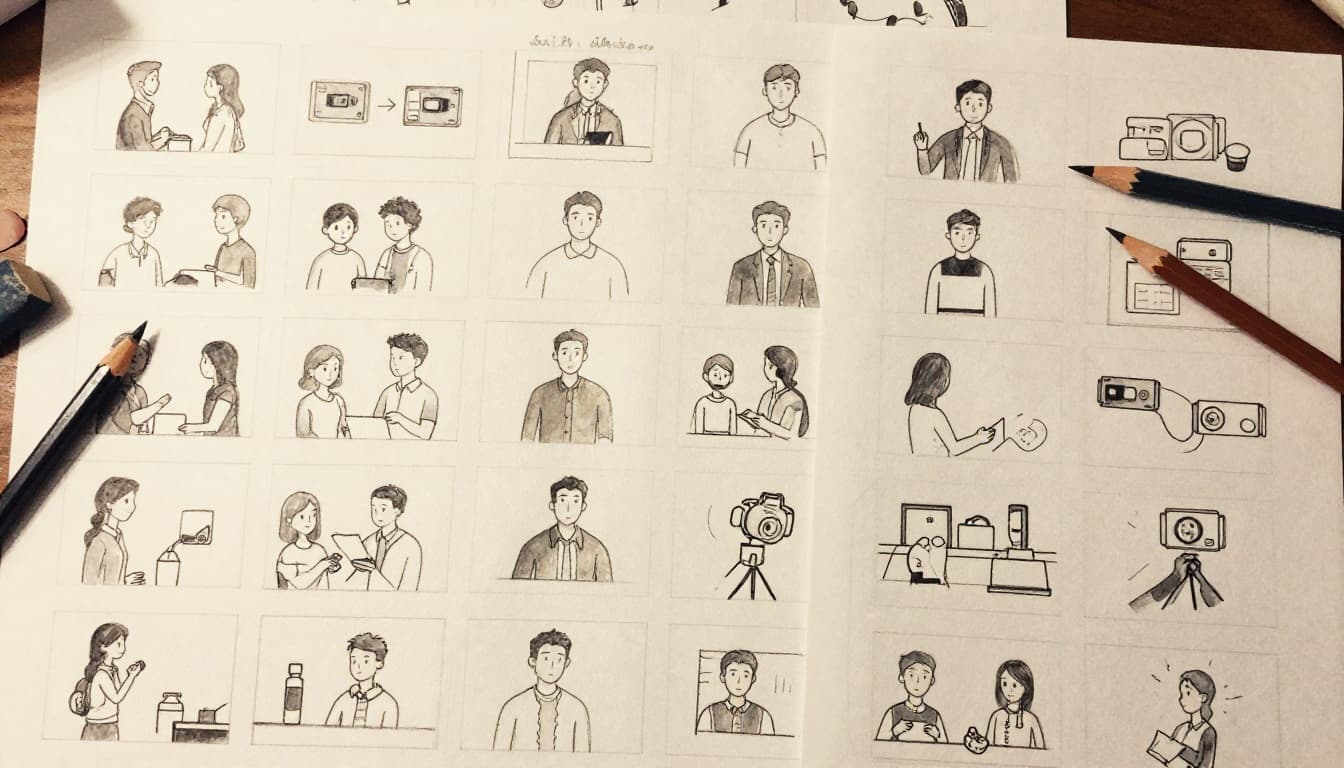
A good shot list answers:
- What angle?
- What lens feel (wide, medium, close-up)?
- What action?
- What audio needs?
Finally, plan coverage. One wide shot won’t save a scene. You want at least two angles for most talking segments. If your video is tutorial-based, include b-roll for each step.
Prep Every Detail: Locations, Team, Talent, and Gear Check
Planning doesn’t stop after you lock the script. It keeps going until shoot day feels boring. Boring is good. It means the team knows what to do.
Location prep affects light, sound, movement, and safety. Team prep affects communication and pacing. Talent prep affects delivery and timing. Gear prep affects quality and options.
If you skip any part, you’ll feel it during filming. Reshoots cost time and money. They also create a “we’re behind schedule” mood that spreads across the crew.
Scout Locations and Secure Permits
Scout early, even if you’re filming in a “simple” space. Check:
- Lighting at the time you’ll shoot
- Background noise (traffic, HVAC, voices)
- Weather risks (wind for outdoor audio)
- Power access and extension needs
- Parking and safe walk paths
Permits can take time. Also, rules can vary by city and county. If you’re not sure, call the local office and ask early. Many delays come from assumptions, not reality.
Bring backups. If the main spot fails, you need alternatives. For example, you might plan a second angle in a hallway if an outdoor area gets too loud.
Assemble and Brief Your Team and Talent
A team without roles turns into chaos. Even small crews need clarity.
Assign responsibilities. Common roles include:
- Director (calls action and pacing)
- Camera operator (frames and manages settings)
- Sound tech (audio monitoring)
- Producer or coordinator (timeline and logistics)
Brief talent with a call sheet. Include:
- Arrival time
- Shoot order
- Wardrobe notes
- Any key phrases they’ll say
Also handle release forms before filming. If you’re interviewing people or filming a private location, you need the right paperwork. Missing forms can stop editing or delay delivery.
For on-camera talent, do a short run-through. Even 10 minutes can improve delivery and reduce takes.

Then hold a pre-pro meeting. Review the script, confirm the schedule, and walk through the biggest risks. If weather shifts, who decides? If audio fails, what’s the backup plan?
Gear Up and Test Logistics
Gear checks prevent the most frustrating kind of failure: technical surprises.
At minimum, test:
- Camera settings and frame rates
- Microphones (distance, gain, background noise)
- Lighting output and color match
- Battery life and storage space
- Media backup plan
If you’re renting gear, book early and keep a buffer for pickup delays. Also, plan rentals around your timeline, not your idea.
Film extra footage. It’s one of the cheapest ways to improve the final edit. Capture:
- B-roll for each section
- Establishing shots of locations
- Alternative angles for talking-head moments
- Cutaway reactions for transitions
Finally, rehearse logistics. Confirm where people park, how they move, and how you reset between scenes. When you handle these details in pre-production, production day stops feeling like problem-solving.
Dodge These Common Pre-Production Mistakes for Pro Results
Most video projects don’t fail because of talent. They fail because of planning gaps.
Here are the most common pre-production mistakes, plus why they hurt and how to fix them quickly.
- Skipping audience research: You end up making a video for “everyone.” Fix it by testing hooks and studying retention patterns first.
- Building a wish budget: You undercount crew time, locations, and post-production work. Fix it by listing real tasks, then adding a buffer.
- No shot list or storyboard: Filming turns into random coverage. Fix it by writing shot requirements per scene before you roll cameras.
- Weak communication: People misunderstand approval timing and roles. Fix it with a single source of truth for schedules and documents.
- Ignoring risks like weather and noise: You lose key takes on set. Fix it with backup locations and spare audio options.
- Rushing post-production planning: You discover edit needs after filming. Fix it by mapping how each asset will be used.
If you want a safe shortcut, use a checklist template. A solid starting point is The Ultimate Video Pre-Production Checklist Template – Boords. It’s built for organized client workflows, and the structure helps you spot gaps fast.
In practice, your pre-production steps for video projects should feel like building guardrails. You’re not trying to control creativity. You’re protecting it from avoidable mistakes.
Next, grab your copy-ready checklist so your next project starts with fewer surprises.
Wrap-Up: Turn Pre-Production Steps into Real Results
Your video succeeds before the first take. That’s why the essential steps before starting a video project matter so much. When you set goals, research your audience, plan your budget, and map shots, the shoot day runs smoother.
Also, when you prep locations, brief your team, and test gear, you remove the biggest causes of reshoots. Then you can focus on filming strong moments, not fixing preventable problems.
If that opening hook about pre-production saving money felt familiar, take action now. Download a checklist template, then run it for your next shoot.
What’s the one pre-production mistake you never want to repeat again? Share it, and it can help someone else avoid your same problem.